
The Redox Platform API is an API tool that allows you to manage your Redox organization. Learn more about the Redox Platform API.
To send a Platform API request, you must create and authenticate a user-level API key, which authorizes an individual requesting user. Some API functionalities might be restricted, depending on the individual user’s permissions.
- A user must be assigned to an engineer role to create or authenticate API keys. Learn about user roles.
- If you choose option 2 for creating a user-level API key, you must have an existing public key. This can be either a JWKS URL or or JWKS entry.
- Log in to the Redox dashboard.
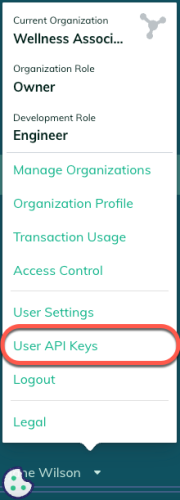
- In the bottom-left navigation menu, click your username to open the user menu.
- From the user menu, select the User API Keys option.

User API Keys option - The User API Keys page opens and displays any existing user-level API keys. To create a new one, click the Create API key button.
- A modal opens with API key details. In the Name field, enter the API key name.
- Click the Create API key button.
- The new user-level API key appears in the table. The Public Key column shows JWKS with 0 key(s). Click the Public Keys button to generate new keys or provide a public key you already have.
- A modal opens for the public key. Choose one of the following options to continue:

Next, you must request an access token with an auth request. Follow the OAuth API key instructions for requesting and storing an access token.
After getting an access token, you’re ready to initiate API requests to any of the Platform API endpoints: https://api.redoxengine.com/platform/{endpoint}.
Each Platform endpoint has different requirements, path parameters, or request parameters. Explore each endpoint schema for their respective requirements.