This is a closed beta feature for a limited pilot group by invitation only. We’re not currently accepting additional participants, but we’ll let you know when it’s available to everyone.
With Redox, you can orchestrate how data moves across your healthcare ecosystem. Orchestrating means you control how and when data moves with conditional rules and custom logic.
Orchestration treats data processing like a set of building blocks that can be assembled to solve specific problems rather than laying out a static assembly line that runs the same way every time.
Use cases
Some common use cases for using custom rule processing are:
Multi-destination routing: Send the same data to multiple destinations at once, based on rules or message type.
Example: Send to your app but also to your FHIR® store.
Conditional rules: Define business logic that decides how data should be process or routed based on conditions
Example: Send CHF discharges to PCP and cardio clinic; all others go only to PCP.
Data fetching and bundling: Pull in extra data automatically and package it together in one.
Example: If you see a discharge, get patient summary from HIE.
Enrichment: Partway through processing, you can gather data from a partner vendor to enhance existing data before being delivered to a destination.
Example: Normalize a list of procedures into CPT codes.
Example: Extract ICD-10 codes from clinical notes.
Example: Match result against EMPI to add correct patient ID.
Scoring and calculations: Perform real-time computations on data so destination systems don't need to handle raw field.s
Example: Calculate patient's BMI from height and weight.
Have visibility into your processing rather than a "black box" of guesswork.
Building blocks
To orchestrate your data, you can compose unique workflows that meet the healthcare needs of your organization.
Specifically, you can use composable processors, which are inserted into your data processing. A processor is like a recipe with base ingredients (i.e., operations) along with spices or garnishes that can be tweaked to your liking (i.e., parameters). This means you can use the same processor in multiple contexts.
Currently, a Redoxer can build or edit processor(s) for you.
Processors in logs
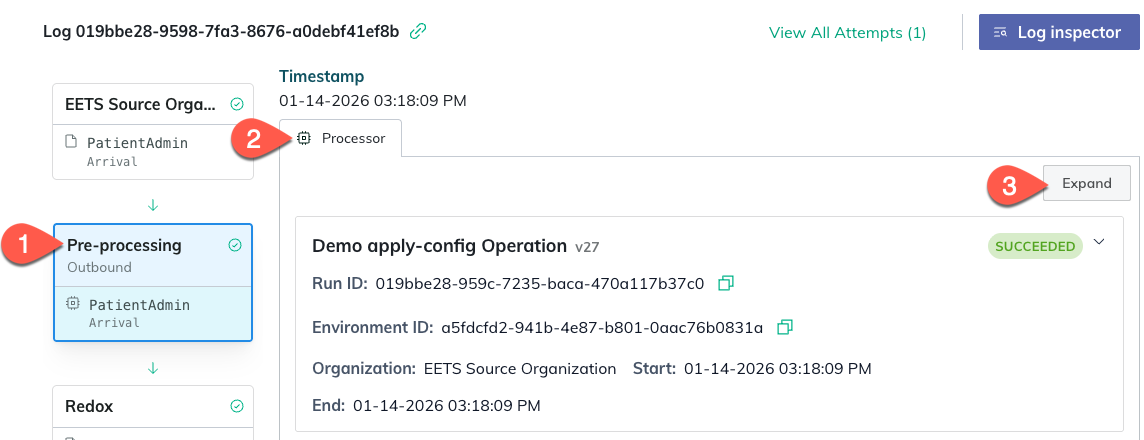
You can view processors directly in your logs by clicking on the log stage where a processor is linked.
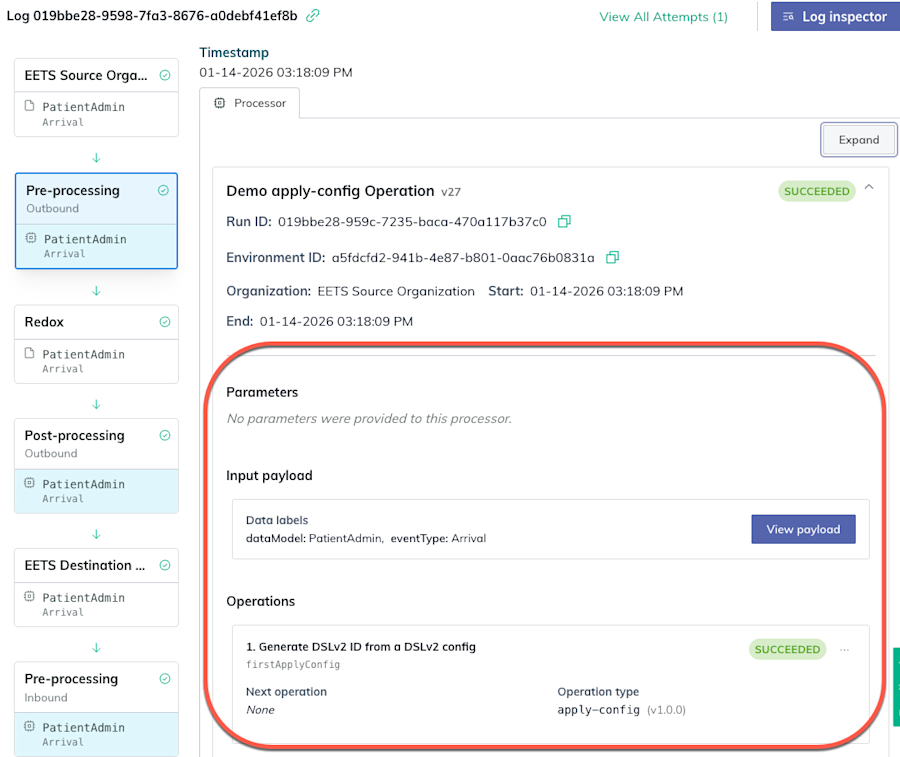
You can click the Expand button to view more details, including the processor operations, parameters, and input and output payloads. For operation and parameters definitions, review the technical reference at the end of this article.
View a processor in the linked log stage
Expanded view of processor details
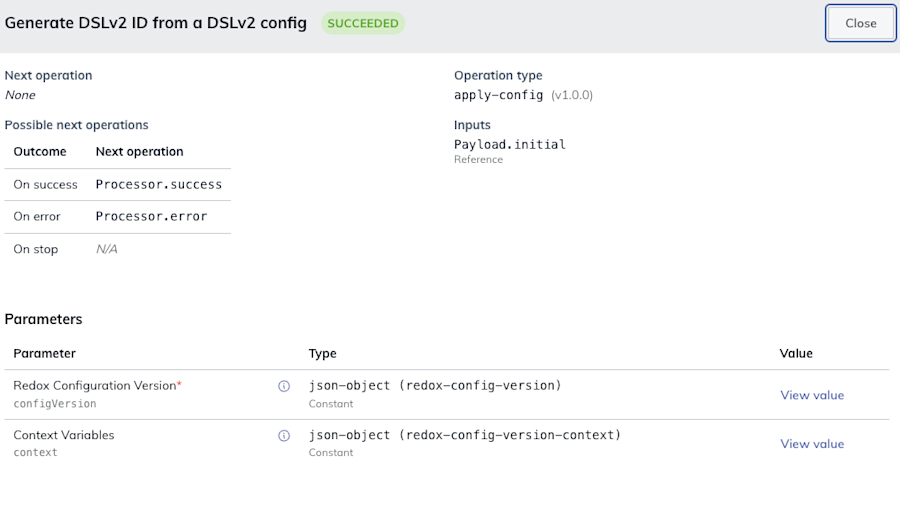
By clicking the three-dots icon of an operation, you can open the operation to view more details as well.
View an individual operation’s details
Review the technical reference below to understand the individual pieces of a processor.
Log stages
There are four log stages where processors can run:
Pre-processing (outbound)
Post-processing (outbound)
Pre-processing (inbound)
Post-processing (inbound)
Learn more about log stages. A Redoxer must link a processor to one of these processing locations for the processor to run. Only one processor can be linked at a given log stage.
Technical reference
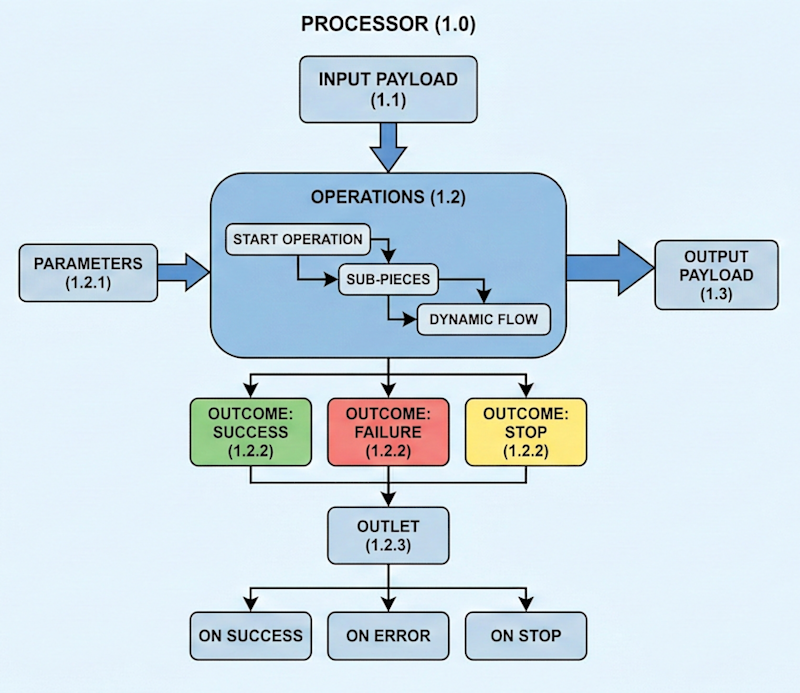
In more technical terms, a processor looks a little like this:
Processor
Input payload: The initial data the processor ingests to begin working. The input doesn't necessarily have to be the output of a previous processor. The input is determined by the defined rules and custom logic.
Operations: The action(s) to take during this period of processing. These execute in a dynamic flow based on the sub-pieces. You can think of operations like a flow chart, which says what should happen next if this and when.
Parameters: The custom settings for operations, which determine what action to take based on the context during processing.
Outcome: The outcome of an operation during a specific processor run. This could be success, failure, or stop. Based on the outcome, the next operation can vary, depending on what just happened in the previous processing step.
Outlet: The logic that determines what happens next.
If the operation fails, the "on error" operation will happen next.
If the operation stops, the "on stop" operation will happen next.
If the operation succeeds, the "on success" operation will happen next.
Output payload: The final data the processor produces. This can be used an input for any following processors, but doesn't have to be the subsequent processor.
Visual diagram to show the parts of a processor.
Composable operation types
A processor can use the same type of operation multiples. Each instance of an operation gets a unique ID to reference in a log.
There are two categories of operation types, specifically for either data processingor flow control.
Review the available operation types.
Data processing operations
These operations process data to make more data.
Each operation has parameters you can use to fine tune how it executes.
The apply configoperation can:
format a web request to match an external API; or
modify a FHIR® bundle; or
apply a Redox base config.
Redox base config
A Redox base config converts a payload from a given system’s format to the appropriate Redox data model or FHIR® resource. These conversions happen on both sides of the exchange so that you or your connection gets data in the expected format.
Required parameters
Parameter
Notes
configVersion
Specifies the version number of the Redox base config to use.
Optional parameters
Parameter
Notes
context
Defines the variables (e.g., time zone, destination ID, destination name, destination environment) that set the context of the operation.
The build authenticated request operation can use an existing auth credential to prepare a request for the send HTTP request operation.
Designates the endpoint URL to send the request to.
Optional parameters
Parameter
Notes
body
Populates the request body content.
certificate
Provides certificate chains in PEM format. Each cert chain should consist of the PEM formatted certificate for a provided private key, followed by the PEM formatted intermediate certificates (if any) in order, not including the root certificate authority.
certificateAuthority
Defines the hierarchy of certificate authorities that will override the system’s default.
headers
Defines the HTTP headers to include in the request.
key
Provides the private key in PEM format.
The build JSON operation can:
combine multiple payloads into one;
add more resources to a FHIR® bundle; or
use context from the processor or parameters from the operation to build a payload.
Required parameters
Parameter
Notes
schema
Specifies the Redox schema to apply to the input payload(s).
The convert from JSON operation can turn a JSON representation of:
HL7v2 into a well-formatted HL7v2 message;
XML into an XML document; or
X12 into a valid X12 message.
Required parameters
Parameter
Notes
toFormat
Specifies the format to convert the JSON payload to.
Optional parameters
Parameter
Notes
customSchema
Specifies the custom schema to use for converting the format (HL7v2, X12, X12v2 only).
The convert to JSON operation can turn:
a well-formatted HL7v2 message into a JSON representation of HL7v2;
an XML document into JSON representation of XML; or
a valid X12 message into a JSON representation of X12.
Required parameters
Parameter
Notes
fromFormat
Specifies the data format of the incoming payload, i.e., the format to convert to JSON.
Optional parameters
Parameter
Notes
customSchema
Specifies the custom schema to use for converting the format (HL7v2, X12, X12v2 only).
The modify JSON operation can:
combine multiple payloads into one;
add more resources to a FHIR® bundle; or
use context from the processor or parameters from the operation to build a payload.
Required parameters
Parameter
Notes
flavor
Specifies what to do with a value, i.e., put (or set) or delete.
selector
Identifies the field path (i.e., JSON expression) to select the value(s) from.
schema
Only required when flavor is put (not needed when flavor is delete).
Specifies the Redox schema to apply to the input payload(s).
The pluck operation can extract:
a single value like a provider NPI from a payload;
a list of values like medications from a payload; or
an object like a single encounter from a payload.
Required parameters
Parameter
Notes
selector
Identifies the field path (i.e., JSON expression) to select the value(s) from.
Optional parameters
Parameter
Notes
includeMatchPath
If set to true, the matched values will be objects that contain the source path and the value found at the selector path.
stopOnNoMatch
If set to true, the operation stops if the selector doesn’t match any elements in the input payload.
If set to false, the operation continues to process if the selector doesn’t match any elements in the input payload.
unwrapSingleResult
If set to false (default), the operation always returns an array.
If set to true, the operation returns either:
a) the value directly when exactly one match is found;
b) null when no matches are found; or
c) errors if multiple matches are found.
The run processor operation allows you to build reusable logic blocks that condense complex operations into a single step in another process.
Use this operation to build workflows
This is the operation that we use to build workflows out of multiple processors.
Processors can even be shared with other organizations using grants.
Required parameters
Parameter
Notes
processor
Specifies the process to run by ID and version.
Optional parameters
Parameter
Notes
parameters
Indicates which parameters to pass to the downstream processor.
The send HTTPS request operation can:
push data to an API;
query data from an API;
use an LLM to summarize data or generate content; or
extract data from text using a Natural Language Processing (NLP) API.
This operation doesn’t have parameters.
The translate values operation can use your translation set to replace a set of terms with a set you prefer.
Identifies the field path (i.e., JSON expression) to select the value(s) from.
translationSet
Specifies the ID of the translation set to apply with this operation.
The owner of the processor must own the translation set, too.
The environment of the processor must match the environment of the translation set.
Optional parameters
Parameter
Notes
stopOnNoMatch
Indicates that if the selector doesn’t match any elements in the input payload, the operation stops.
Flow control operations
These operations control the flow of the processor.
The branch operation changes which operation happens next depending on the current context. It evaluates a condition based on data or metadata.
If true, go to X operation.
If false, go to Y operation.
Required parameters
Parameter
Notes
nextOperationIfFalse
Specifies the next operation to execute if the condition evaluates to false.
nextOperationIfTrue
Specifies the next operation to execute if the condition evaluates to true.
operator
Specifies which operator to use to evaluate the condition.
terms
Defines an array of selector paths to use to evaluate the condition.
Optional parameters
Parameter
Notes
caseSensitive
Indicates whether the condition is case sensitive.
The map collection operation can:
query for every encounter in a FHIR® bundle;
summarize every document reference in a list of document query results; or
normalize every reaction of every allergy in a PatientAdmin.Arrival message
Required parameters
Parameter
Notes
initialOperationKey
Identifies the key of the first operation to execute for each item in the collection.
itemPayloadKey
Specifies the payload.reference key to assign to each item in the collection during processing.
operations
Specifies which operations to perform on each item in the collection.
selector
Identifies the field path (i.e., JSON expression) to select the value(s) from.
Optional parameters
Parameter
Notes
chunkSize
Specifies the number of items to process concurrently. The default is 1.
This is distinct from bundling multiple items to be processed at once, which should be handled externally by creating bundles with the build json operation.
errorOnFirstItemError
If set to false (default), this operation continues retrying each failed item until reaching the maximum number of retries and returns an error if any item has an error. Otherwise, the operation successfully continues processing.
If set to true, this operation errors upon encountering the first item processing error.
filterEmptyItems
If set to false (default), empty items remain in the final output collection.
If set to true, empty items will be removed from the final output collection.
includeItemMetadata
If set to false (default), this operation returns only the content of each payload.
If set to true, this operation returns full payload objects, including metadata (ID, dataSchema, dataLabels).
retryAll
If set to false (default), this operation retries only the items that failed.
If set to true, this operation retries all items in the collection if any item processing fails.
stopOnEmptyCollection
If set to false (default), this operation succeeds and returns an empty collection.
If set to true, this operation stops when the collection is empty.
stopOnNoMatch
If set to false (default), this operation returns an empty collection.
If set to true, this operation stops if the selector doesn’t match any elements in the input.
Grants
Processors belong to the specific Redox organization they're created for. Each processor has an owner. However, you can grant access to a processor that you own to give your connection access to view and use it.
A grant only allows the processor to be used in the same environment type. For example, if you grant access to a staging processor, it can only be used in another organization's staging environment.
When a grant is used, it's called a grant activation. Redox creates an activation record to track usage.
FHIR® is a registered trademark of Health Level Seven International (HL7) and is used with the permission of HL7. Use of this trademark does not constitute an endorsement of products/services by HL7®.