When exchanging data between systems, you don’t always get data exactly the way you want it. A config modifier solves this by allowing you to create conditional rules that automatically change a data payload. Whether you need to add a missing value, move a field to a different location, or delete sensitive information, config modifiers provide the flexibility to reshape data to meet your unique needs.
Config operations
Several operations run during log processing, but config operations are the fundamental part of data exchange. Learn about operations.
First, we create base configs, which contain instructions for converting data to and from the appropriate format, based on a subscription’s settings.
You can create config modifiers, which are custom instructions for processing incoming or outgoing data. Usually, the input payload is output immediately after Redox applies a base config.
Config modifiers might be independent, but they’re typically applied on top of a Redox base config.
Confidential data in config modifiers
The contents of a config modifier might contain confidential data, like personal health information (PHI). Because of that, the contents are only visible to the organization that manages the config modifier.
If your organization doesn’t own the config modifier, you’ll see its name, flavor, and status without the contents in the operation details of log inspector.
Common use cases for config modifiers
Config modifiers can help with many use cases. You’ll usually find opportunities to use config modifiers during implementation testing if you or your connection don’t receive data you expect.
Different sites expect different things. You can hardcode fields and values so that your connection always gets the required data. For example, you might expect a certain document ID type or sending facility code in every message.
Scenario: You’re receiving a PatientAdmin data model from your connection.
Problem: Your connection (i.e., source system) isn’t populating the MSH.4 (i.e., FacilityCode) segment. Your system expects the sending facility code in Meta.FacilityCode.
Goal: Populate the FacilityCode with a specific value. In this case, you know the code should always be acme-123.
Input payload: In this input payload, you see the facility code is missing from the Meta object.
Example: Input payload for hardcoding a field
json
1
{
2
"Meta":{
3
"DataModel":"PatientAdmin",
4
"EventType":"Arrival"
5
}
6
}
Selector: First, define where you want the config modifier to populate a value.
Example: Selector for hardcoding a field
json
1
$.Meta.FacilityCode
Schema: Next, build your schema to hardcode the FacilityCode value on each PatientAdmin message from this source feed with this keyword:
constant: Since you want to output the same value on each message, you need to use the constant keyword. Learn about constant.
Example: Config modifier schema for hardcoding a field
yaml
1
constant: acme-123
Output payload: This config modifier would result in the hardcoded FacilityCode value in the Meta object.
Example: Output for hardcoding a field
json
1
{
2
"Meta":{
3
"DataModel":"PatientAdmin",
4
"EventType":"Arrival",
5
"FacilityCode":"acme-123"
6
}
7
}
Different sites configure their messages differently, so data might be found in unusual places. Redox base configs account for most of these variations. But if a value is missing from the segment you expect, you could write a config modifier to pull that value from another segment. For example, your connection sends the time the visit starts in an unexpected segment.
Scenario: You receive a Scheduling.New message from your connection (i.e., the source system).
Problem: Your system expects VisitDateTime to be populated with the time the visit starts, but in testing, you notice you’re receiving the time the visit ends. Also, the value isn’t in your preferred date-time format.
Goal: Populate the VisitDateTime from SCH 11.1 (the time the visit starts) instead of SCH.11.4 (the time the visit ends).
Input payload: In this input payload, the desired start time (20240603165602) is located at SCH.11[0].1.1.
Example: Input payload for populating a field
json
1
{
2
"SCH":{
3
...
4
"11":[
5
{
6
"1":{
7
"1":"20240603165602"
8
},
9
"2":{
10
"1":""
11
},
12
"3":"",
13
"4":{
14
"1":"20240603175602"
15
}
16
}
17
]
18
}
19
}
Selector: First, define where you want the config modifier to populate a value.
Example: Selector for populating a field
json
1
$.Visit.VisitDateTime
Schema: Next, build your schema to retrieve the value at SCH 11.1 and reformat it with these keywords:
use: You need to access the initial HL7v2 payload, which is outside the scope of the selector path. That means you need to include use. Learn about use.
get: You need to define where to get the value from to populate the selector path.
plugin: You need the date-time value to be in ISO-8601 format, so you need to use a plugin to reformat. Learn about plugin.
name: Use the date-time plugin to format the value.
action: To reformat the incoming value into ISO-8601, use parse.
parameters.standard: Identifies the current format of the incoming value, which is in HL7 format.
Example: Config modifier schema for populating a field
yaml
1
use: initialPayload
2
get: SCH.11[0].1.1
3
plugin:
4
name: date-time
5
action: parse
6
parameters:
7
standard: HL7
Output payload: This config modifier results in using the desired start time in the correct format.
Example: Output payload for populating a field
json
1
{
2
...
3
"Visit":{
4
...
5
"VisitDateTime":"2024-06-03T16:56:02.000Z"
6
}
7
}
Sometimes a site is inconsistent with their own message formatting. A site might populate a value in one field in some messages but leave it blank or populate a different field for other messages. This can happen if your connection handles IDs and codes differently based on the visit or order type.
Scenario: Your connection sends a Visit ID in one segment for some types of visits, but in a different segment for other types of visits.
Problem: Sometimes the input payload looks like Example 1, and sometimes it looks like Example 2. Redox handles the visit ID correctly for Example 1. But in Example 2, Redox uses null for the visit ID because it’s not where we expect.
Goal: Populate visit ID regardless of the visit type.
Input payload: These input payloads show the different locations visit ID might be.
Example: Input payload 1 for accounting for inconsistent messaging
json
1
{
2
...
3
"PV1":{
4
...
5
"19":{
6
"1":"1234"
7
}
8
}
9
}
Example: Input payload 2 for accounting for inconsistent messaging
json
1
{
2
...
3
"PV1":{
4
...
5
"50":{
6
"1":"1234"
7
}
8
}
9
}
Selector: First, define where you want the config modifier to output a value.
Example: Selector for accounting for inconsistent messaging
json
1
$.Visit.VisitNumber
Schema: Next, build your schema to look for visit ID depending on whether PV1.19.1 is populated or not with these keywords:
use: You need to access the initial HL7v2 payload, which is outside the scope of the selector path. That means you need to include use. Learn about use.
if: The action to take is a conditional decision. That means you need to include if to define the logic for each condition. Learn about if.
operator: First, Redox should check that the value exists, so you should enter all. Learn about operator.
terms: Next, Redox should check whether PV1.19.1 exists, so that value is our singular term. Learn about terms.
get: Define where to get the value from to populate the selector path. Learn about get.
then: Define what should happen when the if scenario is true. In this case, use PV1.19.1 if it exists. Learn about then.
get: If PV1.19.1. exists, retrieve its value. Learn about get.
else: Define what should happen when the if scenario isn’t true. In this case, use PV1.50.1 if PV1.19.1 doesn’t exist. Learn about else.
Example: Config modifier schema for accounting for inconsistent messaging
yaml
1
use: initialPayload
2
if:
3
operator: all
4
terms:
5
-get: PV1.19.1
6
then:
7
get: PV1.19.1
8
else:
9
get: PV1.50.1
Output payload: This config modifier results in populating the visit ID, regardless of whether PV1.19.1 is populated or not.
Example: Output payload for accounting for inconsistent messaging
json
1
{
2
...
3
"Visit":{
4
...
5
"VisitNumber":"1234"
6
}
7
}
Sometimes a site can’t parse or receive data you have in its existing format. If the data format is incompatible, it might return an error or the site won’t receive important data.
Scenario: Your connection doesn’t accept underscores for the Observation codes under OBX.3.1.
Problem: We can’t simply use the text plugin for replace where we replace all the underscores with an empty string because it will return as undefined.
Goal: Remove the underscores under every Observation code (OBX.3.1)
Input payload: In this input payload, you see the text string with extra underscore (_) characters.
Example: Input payload for removing characters from a text string
json
1
"PATIENT_RESULT":[
2
{
3
"ORDER_OBSERVATION":[
4
{
5
...
6
"OBSERVATION":[
7
{
8
...
9
"OBX":{
10
...
11
"3":{
12
"1":"STD_DEV_SMBG",
13
"2":"Standard deviation across SMBG values in 14 days",
14
"3":null
15
}
16
}
17
}
18
]
19
}
20
]
21
}
22
]
Selector: First, define which text string you want to remove characters from.
Example: Selector for removing characters from a text string
Schema: Next, build your schema to look for the unnecessary characters and remove from the text string with these keywords:
pipe: You need to use the output of the first keyword action as the input of the second. Learn about pipe.
plugin: Plugins are common actions you can leverage for your schema.
text-split: The text plugin is for manipulating string values. The split action removes the underscore (_) characters. Learn about the text plugin.
array-join: The array plugin is for manipulating array values. The join action combines the text string that was split after removing the underscore (_) characters. Learn about the array plugin.
Example: Config modifier schema for removing characters from a text string
yaml
1
pipe:
2
-plugin:
3
name: text
4
action: split
5
parameters:
6
separator: _
7
-plugin:
8
name: array
9
action: join
10
parameters:
11
separator:''
Output payload: This config modifier results in removing the extra underscore (_) characters from OBX.3.1.
Example: Output payload for removing characters from a text string
json
1
"PATIENT_RESULT":[
2
{
3
"ORDER_OBSERVATION":[
4
{
5
...
6
"OBSERVATION":[
7
{
8
...
9
"OBX":{
10
...
11
"3":{
12
"1":"STDDEVSMBG",
13
"2":"Standard deviation across SMBG values in 14 days",
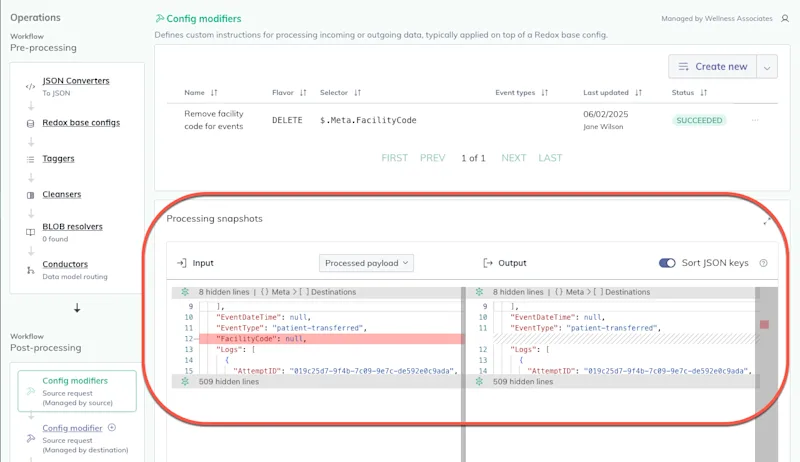
A config modifier can either write new data to or delete existing data from a payload. Usually, the output of applying a Redox base config serves as the input payload for a config modifier.
Each config modifier has a specific flavor, or type. Currently, we support two flavors:
The Delete flavor allows you to remove specific parts of a payload.
The Put flavor allows you to write data—either replacing existing data or creating new data—to specific parts of a payload.
Config modifiers specify a selector or JSON path that points to the part(s) of a payload that you want to create, replace, or delete. Learn how to choose or write selectors.
A config modifier link is specific to the following:
selector path
subscription
event type(s)
processing location
If multiple config modifiers have the same selector path, they can’t be linked to the same subscription, event type(s), and processing location.
If multiple config modifiers have different selector paths, they can be linked to the same subscription, event type(s), and processing location. During execution, the output from the first config modifier to process becomes the input for the second, and so on.
For Put flavors, there’s also a schema with instructions for how to build or replace data at the specified selector. The schema is built with Redox keywords.
One config modifier can create, replace, or delete values or fields at one selector or path at a time. However, the path value might be an array with multiple values. You must create a config modifier for every selector you want to alter in a payload.
We provide an AI-powered assistant, Config Modifier Assistant, to help you build a config modifier schema with natural-language prompts. But you'll find it helpful to review our build guide to understand how Redox keywords work. Learn how to build a schema.
Linking to log stages
To run a config modifier, you must link it to the correct:
Config modifiers are schemas with keywords that define how to alter data based on certain criteria. Think of them like IF / THEN statements. If the conditions of the schema aren’t met, the config modifier isn’t applied to a log. If a config modifier is applied, there may be changes either to the shape of data, individual values, or both.
Config modifier vs. translation set
Both config modifiers and translation sets can alter specific values in a payload.
When should you use a config modifier versus a translation set?
A translation set maps a list of values from one code set to another. It’s useful if you have lots of values you want to change based on different code sets used by different systems. This is a static mapping that looks for a particular value and translates it to a corresponding value. Learn about translation sets.
A config modifier contains flexible instructions based on conditions. For example, you could map a specific value to another only if another specified field is present. Essentially, a config modifier allows you to define conditional or fallback behavior. Also, you can only define instructions for values at one field path at a time. If you wanted to change lots of values in different locations, you’d have to create a config modifier for each one.
Multiple input payloads
A config modifier can have two input payloads:
JSON version of the original request or response
Output from a previous operation in log processing
This means you can define a config modifier that reads a value from the original payload even if that value is removed during a previous operation. The config modifier can recreate it in the processed payload at the linked processing stage.
Input and output payloads
Promoting config modifiers
During implementation, you can build and test a config modifier in a staging environment. Once you’re confident it works, you can promote it to production.
Every time you edit a config modifier, you create a new version of the asset. If you run into errors or unexpected outcomes after editing, you can restore to a different version to help troubleshoot and find where any errors were introduced. Learn how to restore a config modifier.
FHIR® is a registered trademark of Health Level Seven International (HL7) and is used with the permission of HL7. Use of this trademark does not constitute an endorsement of products/services by HL7®.